- Home
- Braemac Blog
- The Development and History of Solid State Drives (SSDs)
The Development and History of Solid State Drives (SSDs)

About Braemac Americas Team

Early Solid-State Drives Using RAM and Legacy Technologies
Solid-state drives (SSDs) have come a long way from their experimental beginnings in the 1950s, when early non-mechanical memory technologies like magnetic core memory and Card Capacitor Read-Only Storage (CCROS) first emerged. Initially, high costs and limited capacity kept SSDs from replacing traditional hard drives, even as innovators in the 1970s and 1980s experimented with battery-backed RAM drives and small modules for IBM, Amdahl, and Cray systems. By the early 1990s, most vendors had shifted focus away from SSDs, leaving mechanical drives as the default choice. Software-based RAM disks persisted into the 2000s, proving that eliminating moving parts could unlock performance levels that traditional drives could not ma
Flash SSDs Transforming Storage, Speed, and Reliability
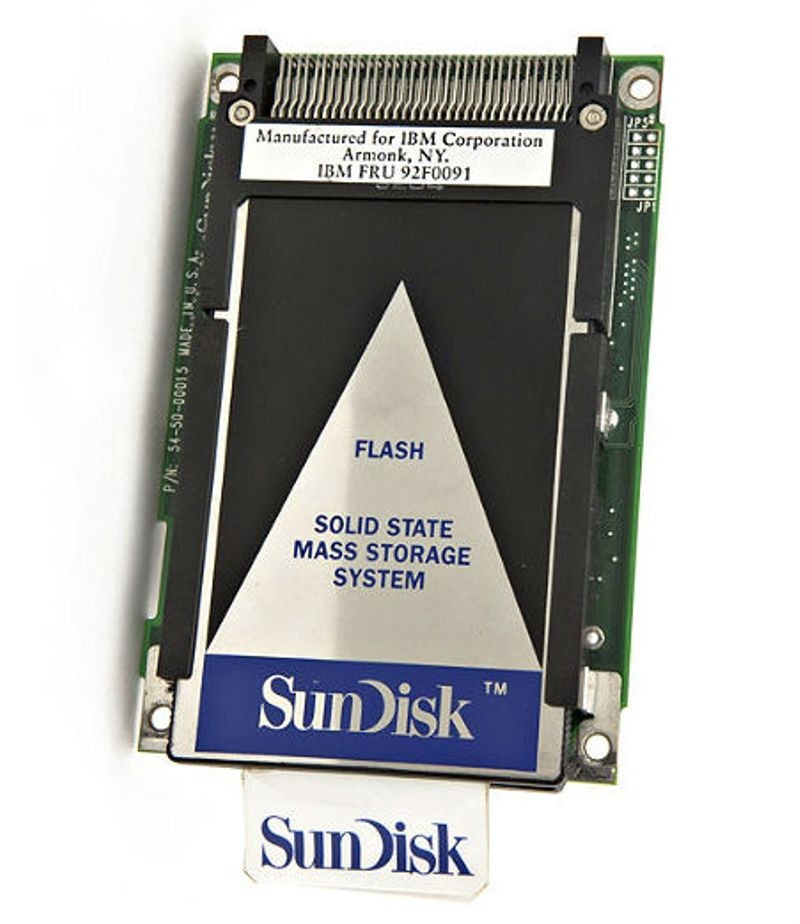
In 1983, a mobile computer became the first to feature four slots for removable flash-based solid-state disks. By 1991, SunDisk (now SanDisk) offered a 20 MB SSD for $1,000. Flash-based SSDs were formally introduced in 1995, eliminating the need for batteries to retain data.
Their reliability and resistance to shock, vibration, and temperature made them popular in military and aerospace applications. Around 2007, PCIe-based SSDs delivered up to 100,000 IOPS on a single card with capacities of 320 GB. Later PCIe x8 designs enabled 1 TB SSDs with read speeds of 712 MB/s and write speeds of 654 MB/s.
Enterprise Flash Drives Delivering High-Performance Storage
Enterprise flash drives (EFDs) are designed for applications requiring high I/O performance (IOPS), reliability, and energy efficiency. There are no standards bodies controlling the definition of EFDs, so any SSD manufacturer may claim to produce EFDs when they may not actually meet the requirements.
Understanding SSD Design and Functionality
The key components of an SSD are the controller and the memory. Early SSDs relied on volatile DRAM. Today, most drives use non-volatile NAND flash. While other minor components exist, the synergy between the controller and the flash memory defines the drive’s character.
Controller
Every SSD includes a controller that bridges the NAND memory to the host computer. The controller is an embedded processor that executes firmware and is a key factor in SSD performance. Some of the functions performed by the controller include:
- Error-correcting code (ECC)
- Wear leveling
- Bad block mapping
- Read scrubbing and read disturb management
- Read and write caching
- Garbage collection
- Encryption
SSD performance scales with the number of parallel NAND flash chips used in the device. A single NAND chip is relatively slow, due to its narrow (8/16 bit) asynchronous I/O interface, and additional high latency of basic I/O operations (typical for SLC NAND, ~25 μs to fetch a 4 KB page from the array to the I/O buffer on a read, ~250 μs to commit a 4 KB page from the IO buffer to the array on a write, ~2 ms to erase a 256 KB block).
When multiple NAND devices operate in parallel inside an SSD, bandwidth increases and latency is effectively masked. Faster SSDs implement data striping (similar to RAID 0) and interleaving. This enabled the creation of ultra-fast SSDs with 250 MB/s effective read/write speeds with the SATA 3 Gbit/s interface in 2009. While SATA once peaked at 500 MB/s, today’s PCIe Gen 5 and Gen 6 drives exceed 14,000 MB/s, delivering throughput required for modern AI workloads.
Memory
Flash-Based Memory
| Comparison of Architectures | |
|---|---|
| SLC vs MLC | NAND vs NOR |
| 10× more persistent | 10× more persistent |
3x faster Sequential Write Same Sequential Read | 4x faster Sequential Write 5x faster Sequential Read |
| 30% more expensive | 30% cheaper |
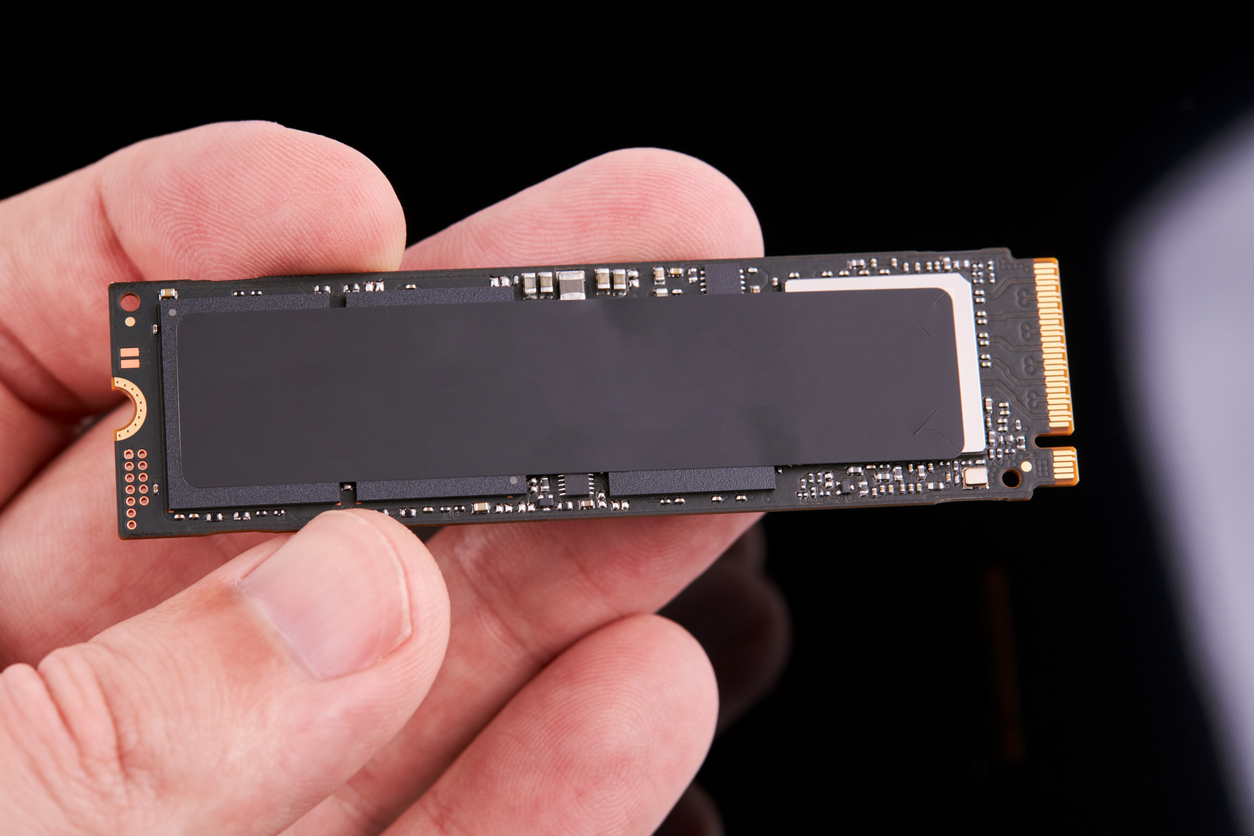
Most SSD manufacturers use non-volatile NAND flash memory in the construction of their SSDs because of the lower cost compared with DRAM and the ability to retain the data without a constant power supply. Flash memory SSDs are slower than DRAM-based storage solutions. Flash memory-based solutions are typically packaged in standard disk drive form factors (1.8-, 2.5-, and 3.5-inch), or smaller unique and compact layouts.
Lower priced drives usually use multi-level cell (MLC) flash memory, which is slower and less reliable than single-level cell (SLC) flash memory. More recent consumer SSDs often use triple-level cell (TLC) and quad-level cell (QLC) NAND, which increase density and reduce cost while lowering endurance.
DRAM-Based Memory
SSDs that use volatile memory like DRAM offer ultrafast data access, typically under 10 microseconds, and are mainly used to speed up applications slowed by flash SSDs or traditional hard drives. These drives usually include an internal battery or external AC/DC adapter. During an outage, the battery copies all information from RAM to backup storage. Once power returns, the data is restored to RAM, and the SSD resumes normal operation, similar to a computer hibernate function. DRAM-based SSDs often use the same type of modules found in PCs and servers, which can be replaced with larger ones if needed.
A remote, indirect memory-access disk (RIndMA Disk) uses a secondary computer with a fast network or (direct) Infiniband connection to act like a RAM-based SSD. Today, the widespread adoption of NVMe-over-Fabrics (NVMe-oF) and high-density flash has rendered these older remote-RAM setups obsolete.
Other Types of Memory
Some SSDs use MRAM. Some SSDs use both DRAM and flash memory. When the power goes down, the SSD copies all the data from its DRAM to flash. When the power comes back up, the SSD copies all the data from its flash to its DRAM. Some drives use a hybrid of spinning disks and flash memory.
Cache or Buffer
A flash-based SSD typically uses a small amount of DRAM as a cache, similar to the cache in hard disk drives. A directory of block placement and wear leveling data is also kept in the cache while the drive is operating. Data is not permanently stored in the cache.
Battery or Super Capacitor
Another component in higher-performing SSDs is a capacitor, which ensures data integrity by allowing cached data to be safely written to the drive if power is lost. With MLC flash memory, a problem called lower-page corruption can occur if power is lost while programming an upper page. This can cause previously written data, assumed safe, to become corrupted unless the memory is supported by a supercapacitor during sudden power loss.
Host Interface
The host interface is not specifically a component of the SSD, but it is a key part of the drive. The interface is usually incorporated into the controller discussed above. The interface is generally one of the interfaces found in HDDs. They include:
- Serial attached SCSI (SAS, > 3.0 Gbit/s) – generally found on servers
- Serial ATA (SATA, > 1.5 Gbit/s)
- PCI Express (PCIe, > 2.0 Gbit/s)
- Fibre Channel (> 200 Mbit/s) – almost exclusively found on servers
- USB (> 1.5 Mbit/s)
- Parallel ATA (IDE, > 26.4 Mbit/s) – mostly replaced by SATA
- (Parallel) SCSI (> 40 Mbit/s) – generally found on servers, mostly replaced by SAS; last SCSI-based SSD was introduced in 2004
Configurations
The size and shape of any device is largely driven by the size and shape of the components used to make that device. SSDs, however, are made up of various interconnected integrated circuits (ICs) and an interface connector, and because they lack moving parts, they can be built in nearly any shape. Some solid-state storage solutions come in a larger chassis, such as rack-mount form factors with multiple SSDs on a shared internal bus and single external connector.
For general computer use, the 2.5-inch form factor (typically found in laptops) is the most popular. For desktop computers with 3.5-inch hard disk slots, a simple adapter plate can be used to make such a disk fit. An SSD can also be completely integrated in the other circuitry of the device, as in the Apple MacBook Air (starting with the fall 2010 model). M.2 is now the modern standard for compact builds, while the industrial sector has shifted toward EDSFF (ruler) form factors for better thermal management and higher density.
Standard HDD Form Factors
The benefit of using a current HDD form factor would be to take advantage of the extensive infrastructure already in place to mount and connect the drives to the host system. These traditional form factors are known by the size of the rotating media, e.g., 5.25-inch, 3.5-inch, 2.5-inch, 1.8-inch, not by the dimensions of the drive casing.

Standard Card Form Factors
For applications where space is premium, like ultrabooks or tablets, a few compact form factors were standardized for flash-based SSDs. There is the mSATA form factor, which uses the PCI Express Mini Card physical layout. It remains electrically compatible with the PCI Express Mini Card interface specification.
The M.2 form factor, formerly known as the Next Generation Form Factor (NGFF), is a natural transition from the mSATA to a more usable form factor. While mSATA took advantage of an existing form factor, M.2 has been designed to maximize usage of the card space, while minimizing the footprint. The M.2 standard allows both SATA and PCI Express SSDs to be fitted onto M.2 modules.
Disk-on-a-Module (DOM) Form Factors
A disk-on-a-module (DOM) is a flash drive with either 40/44-pin Parallel ATA (PATA) or SATA interface, intended to be plugged directly into the motherboard and used as a computer hard disk drive (HDD). The flash-to-IDE converter simulates a HDD, so DOMs can be used without software support or drivers. DOMs are usually used in embedded systems, which are often deployed in harsh environments where mechanical HDDs would simply fail, or in thin clients because of small size, low power consumption, and silent operation.
NAND Flash SSD Wear-Out and Its Impact on Endurance and Reliability
Fundamental to NAND flash design is the risk of irreparable damage to the floating gate from repeated program/erase cycles. Simply put, endurance is limited. The strong electric fields used during these cycles can damage the floating gate, permanently altering NAND cell behavior. This risk increases when an SSD has a limited number of NAND blocks or fixed capacity. Factors such as the amount of data written (workload), how evenly program cycles are distributed across cells (wear leveling), and the ratio of data written to NAND versus data from the host (write amplification) can cause cells to wear out prematurely, reducing SSD endurance and affecting data reliability.
Because MLC NAND requires more program cycles and has a tighter voltage threshold window, its cells naturally wear out faster than SLC NAND cells. Understanding this difference is important, as it directly affects the endurance specified for each block:
- SLC NAND generally is specified at 100,000 write/erase cycles per block.
- MLC NAND typically is specified at 10,000 write/erase cycles per block.
Additionally, data retention is impacted by the state of the floating gate in a NAND cell where voltage levels are critical. Leakage to or from the floating gate may change the voltage level. This altered level may be interpreted incorrectly as a different logical value by the system. Due to the tighter voltage tolerances between MLC levels than SLC levels, MLC flash cells are more likely to be affected by leakage effects. Care must be taken to ensure the long-term data retention capabilities of both SLC and MLC NAND when used in enterprise storage.
4 Techniques Used to Improve Enterprise NAND-Based SSD Reliability and Endurance
On the surface, many of the issues associated with NAND as a storage media may appear too overwhelming or challenging for the technology to be used in the enterprise environment. However, enterprise SSDs integrate a number of advanced techniques and intelligence to help overcome the endurance and reliability limitations at the NAND flash media level:
- Error correction code (ECC): ECC adds extra bits to detect and correct errors. Algorithms like Reed-Solomon and Hamming coding allow an SSD to fix more errors, improving reliability and extending the drive’s lifespan.
- Wear-leveling techniques: Wear leveling spreads program cycles evenly across NAND cells. Static wear leveling moves rarely accessed data to less-used blocks, while dynamic wear leveling distributes data across free blocks, reducing cell wear and increasing overall SSD longevity.
- Use of spare blocks (or overhead): Extra NAND blocks improve endurance by aiding wear leveling and program/erase operations. For instance, a 25 GB SSD may include 32 GB of NAND, with the extra 7 GB enhancing both performance and lifespan.
- Buffering the data: Using a small DRAM buffer optimizes writes, aligns data with erased block sizes, and reduces program/erase cycles, boosting both performance and device endurance.
Navigating Memory Shortages with Braemac Americas
Rising DRAM and NAND flash prices, extended lead times, and shrinking availability are creating real challenges for production and development. Braemac Americas helps customers navigate these shortages by leveraging a broad portfolio of industrial- and enterprise-grade memory partners, including Kingston, Transcend, Silicon Motion, Innodisk, Virtium, Silicon Power, and Runcore. Combined with in-house engineering expertise and roadmap-driven guidance.
Braemac Americas enables OEMs and system designers to evaluate options early, make confident memory decisions, avoid costly redesigns, and maintain production continuity even in volatile markets. By aligning supply strategy with product roadmaps and leveraging trusted supplier networks, teams can stay ahead of constraints and plan for long-term resilience.
Kingston Industrial SATA and NVMe Solid-State Drives
Kingston’s Industrial SATA and NVMe SSDs provide durable, high-performance storage for demanding environments. Available in 2.5‑inch, mSATA, M.2, and PCIe NVMe form factors, these drives support commercial and extended temperature ranges and include advanced NAND management for long-term reliability. Designed for applications such as robotics, kiosks, surveillance systems, and industrial automation, Kingston industrial SSDs deliver consistent performance, predictable endurance, and integration-ready solutions for mission-critical systems.
Transcend Information MTE712A
The MTE712A by Transcend Information is a high-performance M.2 PCIe Gen4 x4 SSD designed for secure and reliable operation in demanding environments. It is a self-encrypting drive compliant with TCG Opal 2.0, featuring hardware-based AES 256-bit encryption and sector-level access control to protect sensitive data. Built with 112-layer 3D NAND, an onboard DRAM cache, and industrial-grade reliability features like anti-sulfur components and Corner Bond technology, it delivers fast, stable performance even in harsh conditions. Wide-temperature MTE712A-I models extend operation from -40°C to 85°C, making the series well suited for industrial and mission-critical applications.
Solid-State Drive Frequently Asked Questions
What is a solid-state drive (SSD) and how did it originate?
A solid-state drive (SSD) is a type of storage device that uses memory chips rather than spinning disks, and its origins trace back to early memory technologies developed in the 1950s, such as magnetic core memory and card capacitor read-only store. Early SSD implementations were primarily used in supercomputers due to their high cost.
What types of SSDs are there?
There are several types of SSDs available, including flash-based SSDs that use NAND memory for persistent storage, DRAM-based SSDs that deliver ultra-fast but volatile performance, and SSDs designed for high-performance, mission-critical environments. Some SSDs also combine flash and DRAM for hybrid operation.
How do SSDs work?
SSDs work by storing data in memory chips and relying on an onboard controller to manage read and write operations. This controller handles tasks such as error correction, wear leveling, bad block management, caching, and garbage collection to maintain performance and reliability.
What is the difference between SLC and MLC NAND flash?
The difference between SLC and MLC NAND flash lies in how data is stored per cell. SLC stores one bit per cell, which results in higher endurance and faster performance, while MLC stores multiple bits per cell, making it more cost-effective but slower and less durable.
How is SSD reliability and endurance improved?
SSD reliability and endurance are improved through techniques such as error correction codes, wear leveling to distribute write cycles evenly, overprovisioning with spare blocks, and buffering or caching to minimize unnecessary writes. These methods help extend drive lifespan and protect data integrity.
What form factors and interfaces do SSDs use?
SSDs are available in a range of form factors, including 2.5-inch, 3.5-inch, M.2, mSATA, and Disk-on-Module, and they support interfaces such as SATA, SAS, PCIe, USB, and Fibre Channel depending on system and application requirements.
How long do solid state drives last?
Understanding how long solid-state drives last depends on the type of NAND used and the workload. SLC offers the highest endurance, followed by MLC, triple-level cell (TLC), and quad-level cell (QLC) NAND. Modern SSDs typically last many years under normal use, especially with wear leveling and ECC.
What is the difference between a solid-state drive and a hard drive?
The difference between a solid-state drive and a hard drive comes down to how data is stored. SSDs store data in flash memory with no moving parts, which makes it faster, more durable, and more power-efficient. A hard drive uses spinning magnetic platters and a mechanical read/write head, resulting in slower access times and greater sensitivity to shock and vibration.
What are TLC and QLC NAND flash?
TLC (triple-level cell) and QLC (quad-level cell) NAND store three and four bits per cell, respectively. These technologies increase density and reduce cost, but they also reduce endurance compared to SLC and MLC. They are widely used in consumer and high-capacity SSDs.
How can Braemac Americas help with selecting or sourcing SSDs?
Braemac Americas leverages its extensive supplier network, working with multiple trusted SSD manufacturers to help customers find the right SSD type, form factor, and interface. This ensures performance, reliability, long-term compatibility, and availability, giving OEMs and system designers confidence in their memory decisions.

Tags:
Computing Solutions
,
Data Processing
,
Embedded
,
Innodisk
,
Kingston
,
Memory
,
Runcore
,
Silicon Motion
,
Silicon Power
,
Storage
,
Supply Chain
,
Transcend
,
Virtium